Shipping, Giving Gifts & Combating the Email Onslaught

seth godin blogI finished reading Seth Godin’s Linchpin a few weeks ago and while I found it to be an interesting read, the main thesis of the text was nothing I didn’t already practise. I strive every day to “ship” and “give gifts” and I can’t evangelise enough on how important both of these concepts are as a teacher.

You have to “ship” because your day is filled with deadlines: lessons to be planned and taught, data to be input, reports to be written and homework to be marked. If you want the learning inside and outside of your classroom to be any good you have to “ship” on all of these tasks. Also, you have to “give gifts” because it’s good to be generous. Share what you do, not to get noticed and win promotion but to help make sure that every student gets the best possible education they can. I love to “ship”. I love to “give gifts”. Why? Because I care about learning. In fact, I love learning; it’s the reason I’m a teacher.

Shipping is fraught with risk and danger.

(Fear of shipping, Godin, 2010)

It’s easy to be afraid of “shipping” and “giving gifts” because many teachers are perfectionists and many teachers are protective about what they do.

  • What if every part of your lesson has not been meticulously planned?
  • What if you didn’t mark every essay in minute detail?
  • If you share an idea or a resource what if someone steals it and presents it as their own?
  • What if no one thinks what you are doing in your classroom is of any value?

To questions like these, I say remember it’s the students in your classroom that matter, so get smart. Digitise everything you do/use and back it up. Reuse and improve should become your personal mantra from day one. The better you get at this the more time you will have for the marking and data analysis which is (honestly) more important than much of the planning that you spend your time doing. What’s more, good formative assessment and understanding your students’ potential will ultimately lead to better planning any way. They inform each other and will lead to better teaching and better learning.

One of the keys for me, in ensuring that I “ship” on time is the way I deal with email. I, like many of you, work at a school where email has become the number one method of communication. However, the reality of this is that your inbox can have a stranglehold on your productivity as a teacher and certainly get in the way of the learning by impinging on the time you should be spending marking, planning and experimenting.

To combat the email onslaught I religiously use the following approach to email set out by Merlin Mann in Inbox Zero. Implement this into your work day when checking your email and your productivity will improve significantly, leaving more time for the marking, planning and most importantly the learning.
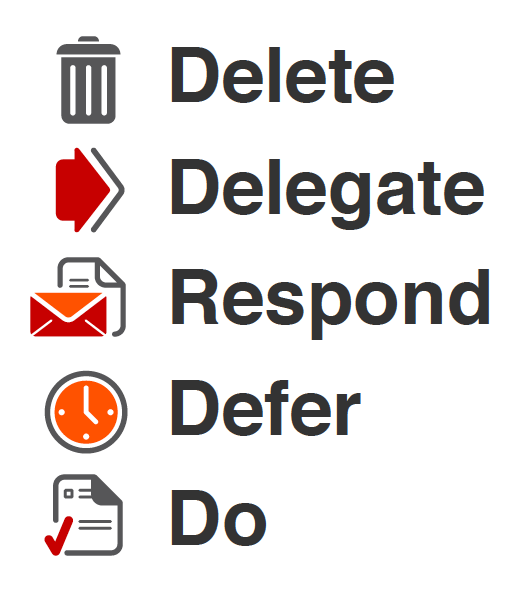
inbox zero

As for “giving gifts”: blog. Blog what you do, get a creative commons license and don’t let someone else show your ideas off. Do it yourself! Deliver CPD, sign up to present at a TeachMeet, build sessions into department meetings to share your ideas and encourage colleagues share what they are doing. If you take control of your gift giving you will find that you can (and will want to) share selflessly. Others will benefit but so will you.

To close, I will give a gift and allow Seth to have the last word:

A life spent curled in a ball, hiding in the corner might seem less risky, but in fact it’s certain to lead to ennui and eventually failure.

(Fear of shipping, Godin, 2010)

Welcome to ‘the zone of optimal challenge’

Futuelab Logo

Last week Merlin John (@merlinjohn) published an article (through FutureLab) titled: “Welcome to ‘the zone of optimal challenge’.” The article is about the Online Games Design course that I was involved with and have tweeted about often using the hash tag #cmdgames. Merlin asked me to provide a quote for the article and I was more than happy to oblige.

He followed up the FutureLAb article with an additional piece on his own blog: Merlin John Online titled: “Chalfonts scores high with Games Design Workshop”.

You can find out more about both the Online Games Design course and the Creative Media Diploma on the Chalfonts Community College ‘Creative Media Diploma Blog’‘. Working to a “real”, “creative” brief, the students collaborated in groups to produce a game related to the 2010 paralympics. The finished work is fabulous and links to play the games can be found here.

The online course was a tremendous success, breaking new ground for online learning and providing further proof of the value that video based conferencing tools (Adobe Connect) can have within education.

The brainchild of Greg Hodgson (@greghodgson) and Roxana Hadad (@rhadad), the online course lasted for 10 weeks and was supported by classroom teaching and a dedicated Moodle course – used to help the students remain organised as they worked on developing their skills as both game designers and game makers.

The students thoroughly enjoyed taking part and the level of progress they made was fantastic. Alongside Greg and Roxana there were a wide variety of people involved in making the course happen including myself, Hannah Stower (@hstower) – Leader for the Creative Media Diploma, Ian Usher (@iusher) – Buckinghamshire E-Learning Co-ordinator, and a sleugh of games designers (who spoke on the course) including Colin Maxwell (@camaxwell) and Josh Diaz (@dizzyjosh).

Thanks to Merlin for writing the articles. I really enjoyed being involved in delivering the course and look forward to helping to improve and deliver it next year.

If you would like to know more about the online course or about our use of Adobe Connect please contact me by email or send me a tweet @jamesmichie.

Lino It – Online Stickies

lino it

A brief post to document a new online tool called ‘Lino It’ which I made use of earlier in the week to complete an “assessment for learning” based lesson with my Year 10 Creative Media Diploma students.

‘Lino It’ is a powerful tool for online collaboration, brainstorming and sharing of information through sticky notes which can include text, hyperlinks, images and video. To some of you this will be sounding very familiar, and you would be right in thinking that it sounds like I am describing Wallwisher; a similar and somewhat better known “sticky notes” tool. However, I feel that ‘Lino It’ is much richer, in part due to the way that it handles video and images, but more to do with what it offers behind the canvas. After signing up (for free) you are taken to your dashboard in which you can create, edit and organise your canvases. You can store favourite canvases, create groups between users and also schedule events (within stickies) that can be linked with your Google calendar.

Most importantly ‘Lino It’ is exceptionally user intuitive. My Creative Media Diploma students’ figured out more about the tool than I had in less than 15 minutes. Letting the students sign up was a great decision as it gave them ownership of their canvas and they were the able to arrange and control the “stickies” that were being added. My most recent discovery (while working on this post) is that you can embed your canvases in to your blog, website or Moodle course. They look fabulous and would make an excellent addition to a blog recording a student’s development of a project or as part of an online portfolio.

Some example canvases:

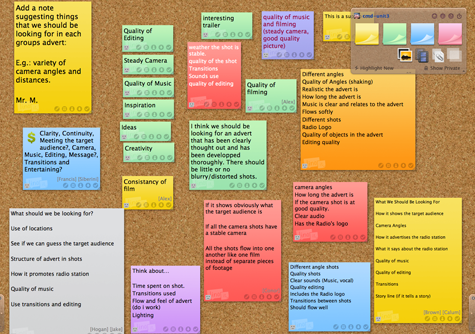
The canvas I used as a starter activity for the “assessment for learning lesson:

starter canvas

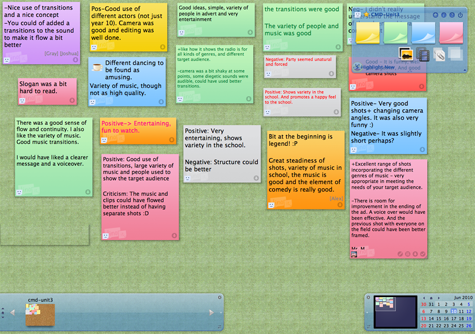
An example student canvas from the same lesson:

student canvas

You can try ‘Lino It’ for free or sign up to get started straight away.

Blog Aesthetics & Improved Functionality

blank book

I had planned to blog about my use of Google Docs this past week. With it being half term, I certainly had the time to do so, but instead, I ended up using much of my time improving the design and functionality of my blog.

Here is a summary of the changes that I have made.

Design
One of the key things that I wished to change was the appearance of the blog, particularly the home page. I wanted it to be more minimal, have less information, with limited colour. Ultimately I wish to just show the 10 most recent blog post titles but for now I have set the blog to simply show the most recent post. I also changed the colour of the “visited links” as they were too light.

I created two new static pages. The first of which was a contact page including a self made form utilising the site:EmailMeForm. The other a dedicated page for the #movemeon book which I contributed to. This allowed me to remove a badge advertising the book from the blog’s sidebar as well as some text and hyperlinks.

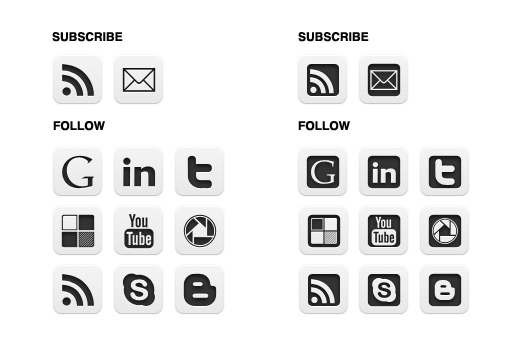
To further improve the look of the blog across all of the pages I made further changes to the sidebar. I began by removing my Twitter stream and some unnecessary text.  I then considered changing the subscription and follow links from plain text to attractive “minimal” buttons.  Using my Twitter PLN I found some links to different button sets. After settling on a set which I found here, I created two mock ups and tweeted them out asking people to vote for either the set on the left or the right.

blog buttons choice

The set on the left received the most votes and that was my preference as well so I decided to go with it and went about adding the buttons to my blog (more about this process below). I also moved the buttons up to the top of the sidebar to increase their visibility. (I’m still mulling over the final row at the bottom which would include my Google Reader shared items, a link to call me on Skype and a link to my school Media Studies blog.

Finally, I edited my About page, updating sections with some of the projects I have been involved with this year.

Functionality
In making some of the aesthetic changes mentioned above I was also able to make some improvements to the functionality of my blog.

Changing the subscription and follow links from plain text to buttons meant that I had to learn more about HTML. (I already had some limited knowledge.) I learned how to add the buttons, hosting them in picasa and then linking to them. I wanted them to open in a new window/tab so I researched the code needed to make that happen and I also learned how to make text appear when the cursor hovers over them. I am very pleased with the finished functionality and hope that their placement at the top of the sidebar will help to increase my web presence.

Having learned how to make web links open in a new window/tab I set about editing all of my blog posts from May to do the same. Sticking with HTML I also added some code to my blog’s template to display related posts titles at the bottom of each post.  This should hopefully keep visitors on my blog for longer reducing my bounce rate. I then also removed the Sharethis widget (and related functionality) and replaced it with a TweetMeme retweet button. (See the bottom of this post.)

Finally, I made two significant changes to improve the subscription feed and data that I can get about my blog’s site traffic. I began by signing up with Google FeedBurner and syncing my old blog feed. I implemented a variety of additions (“FeedFlare”) to improve the promotion of my blog including syncing my Delicious bookmarks into my blog’s feed and making a wide variety of options for sharing my posts available to subscribers. I also set up subscription by email which I had seen on several blogs by people that I respected so felt it would be wise to offer my readers something similar. The final piece of code that I added to my blog was that of my Google Analytics account. It has already provided me with far more interesting information about my blog than the simple visit counter sitting at the bottom of my sidebar (which I may remove very soon).

So, no post about Google Docs but a lot of blog activity none the less. I am happy with the way the blog is looking and for now will give the tweaking a rest. I am not done though. Once the summer holidays begin I think that I will return to this process and do the following:

  • Add code to my blog so that only the blog post titles are displayed on the home page, archive page and label pages.
  • Display both the archive and labels in the sidebar as either a drop-down menu or expandable widget.
  • Add a blog roll of blogs I enjoy reading – also to be a drop-down menu or expandable widget.

I am always happy to know what people think so please comment below or tweet me @jamesmichie.

Image courtesy Štěpán Prokop on Flickr.

Connecting With Parents Online (Part Three)

arrow

Moving Forwards

After the success of last night’s online meeting with parents, my line manager, Greg (@greghodgson) asked me to consider how we (CCC) should move forward with this process. He asked me two questions: 1. How do we push this out across all departments? 2. How do we convince a majority of parents to access it?

Below is my initial response to these questions:

1. How do we push this out across all departments?

So far only English, Media Studies, Maths and Science have delivered online meetings with parents. To get more departments involved I think we need to make the value of the meetings as clear as possible. They offer improved (mass) communication with parents. The parents feel more informed and they really like that they did not have to come all the way to school. Students benefit from improved support from home.

A simple and engaging document that explains the methodology and pedagogy behind the meetings needs to be made available. It is imperative that we market the meetings in the right way therefore I would include quotes from parents giving positive feedback. This could be handed out in either a staff meeting or in a CPD session.  Alongside the document we must capture their interest by allowing them to view a meeting – either a recording or ideally to join in with a live event to get a realistic understanding of how they work.

(We could perhaps be more direct; making it a requirement for all departments to complete at least one online meeting with parents during the next academic year. However, I feel that the quality of the meetings would suffer if this is forced upon departments/teachers.)

2. How do we convince a majority of parents to access it?

The number of parents joining the meetings has been encouraging but moderate. We would like a majority to attend. I personally feel that we need to get better at utilising parent power. (A satisfied customer is the strongest advocate you can have.) We need to get a few of the parents who have attended the meetings to make contact with other parents and share their experiences. Also, we could get the PTA involved in helping to promote them.

We need one brand (maybe a postcard) that can be used for all meetings of this kind that can be quickly and easily produced. I know e-mail works but I do wonder how many parents either did not read the e-mail or read it and forgot about it.  Some times paper still is the best way. We also need to get parents past the fear of it being online (and we need to get teachers past this fear to). Accessing email, clicking on links is daunting for some parents and teachers.

One good question leads to another:

As usual when asked a series of questions I always come back with many more. Here are a few:

  • Is this the solution to improving all parental contact?
  • Could parents evenings be done this way?  What would the implications be if they were?
  • Are these meetings for mass communication only, leaving 1-2-1 communication to remain in the domain of parents evenings, telephone conversations and email?
  • Should tutors be making use of it to introduce themselves to parents at the start of the year?
  • Is Adobe Connect the best solution for us / for the parents? What about Skype or other web based communication systems?

Food for thought! If you have any questions or thoughts about what we have been doing please email me or tweet me.

You can read my previous two posts on Adobe Connect and online parents meetings here and here.

Image courtesy of yago1.com on Flickr.