iPad + Garageband FTW!

I recently shared on Google+ how I had been using iPads and Garageband to help my Year 8 class to improve the quality of their writing. This is a reworked version of that post. Thanks to John Johnston and Helen Morgan (amongst others) for sharing their thoughts.

The learning…

I’ve been using iPads with my Year 8 class to record narrative writing that they have created. I had the students draft a piece of writing based on Down the Rabbit Hole by Lewis Caroll, which they recorded using the iPads. I wanted the students to see how punctuation effected the way the read because after reading the first drafts, I was none too pleased with the standard of their writing.

I uploaded the recordings to the VLE and asked the class to peer assess each others work. Using those comments and some live assessment in Google Docs from me, they created improved narratives with more accurate punctuation and improved vocabulary.

They then recorded their final drafts which we burned to discs. While the drafting/redrafting process is not unusual in the English classroom, recording and evaluating their written work in this way added a new dimension to the learning process. It ensured that every single student’s work was shared without the embarrassment that some students feel standing in front of the class. By putting the audio on the VLE, every student received feedback, which due to time constraints would not happen in a traditional classroom setting. What’s more, I could further differentiate my support by listening and focussing feedback where it was most needed.

To complete the unit I wanted them to present their work effectively. They created a CD cover using drawn or found images, with their narrative writing printed up on the reverse. Giving them a physical artefact to take away that represented their effort and progress was highly motivational and also contributed to the quality of the finished work.

It was a great project to end the year with and the use of the iPads and Garageband made a huge difference to the quality of the students’ work.

Here are two example recordings (personally, I think that the background noise adds to the ambience):

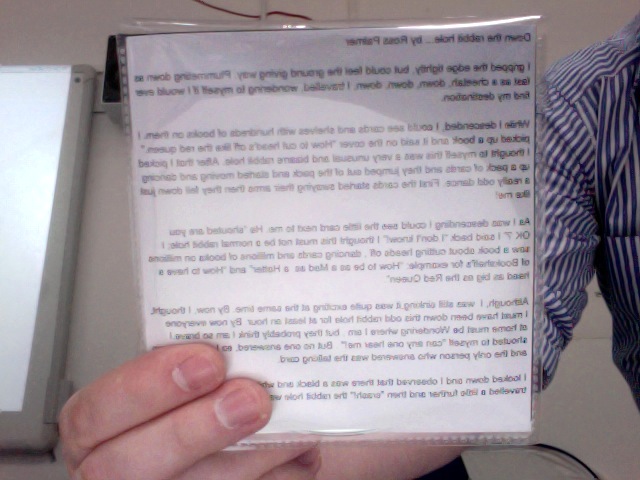
And here is an example cover (front and back):
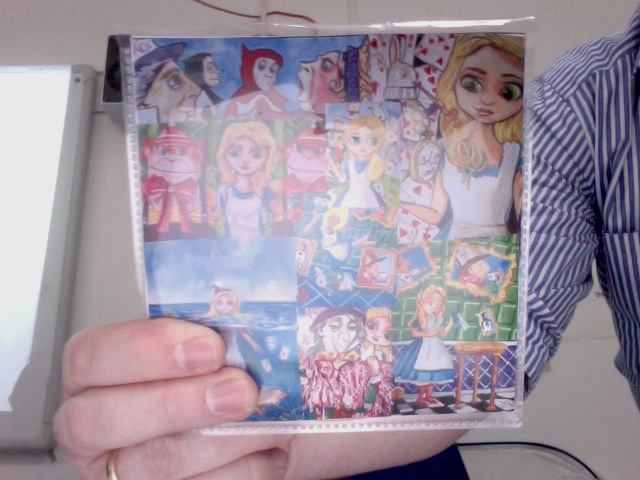
Rabbit Hole Front

Rabbit Hole Back

I used SurveyMonkey to get the class to reflect on their use of the iPads and Garageband. Here’s a selection of comments:

  • “I found it useful because it helps you find your own mistakes”
  • “I found this useful because I could do y punctuation from listening to it because I would know when to put , and . as I know when I paused and stopped at the end of a sentence”
  • “It helped me to see where I need to put commas”

The technology…

The whole process was fabulously straightforward and the sound quality was excellent.

Here are a few tips if you wish to use iPad and Garageband in the same way. Garageband is super easy to use but the default settings can scupper a recording instantly. Before the students hit record make sure that they select the ‘puzzle piece’ in the top left and set the duration to automatic. Not doing so will result in the recording being cut short. Secondly, select the spanner in the top right and turn off the metronome. The iPad will record all sound so it captures the sound of the metronome in the recording.

With those settings sorted you are ready to record. The UI is beautiful and reacts to what you are doing generating relevant buttons, e.g.: when recording a stop button appears and also an undo button to easily take backwards steps. My students found it very easy to use and they (like I was) were really impressed with the sound quality.

What if I don’t have access to iPads and/or Garageband?

I’ve been working with audio/podcasting for over three years now. It is, in my opinion, one of the most underrated mediums in education. Most schools plug for video… it’s usually seen as the obvious choice but there are many activities for which I believe audio to be the best option. Capturing group discussions, for example, is far easier with an audio recorder than a video camera. I do this with my A2 students and then upload the recording to the VLE for them to refer back to and/or download. As it’s an MP3 it is a small file, there is rarely a need to edit, and I find that the students concentrate on what is being said rather than admiring themselves on camera.

I am surprised at the lack of take up when it comes to the use of audio/podcasting in schools because the technology itself is ubiquitous. You don’t need to invest in iPads or Apple Mac computers. Audacity (a free, cross-platform, sound editor) will do the same job as Garageband and most laptops (including notebooks) come with a built in Mic. However, cheap USB Mics are easy to get hold of. This one has done the job for me in the past. Furthermore, nearly all mobile devices have an audio capture function which is easy to manage (audio formats are far more malleable) whereas video recorded on mobile devices can be difficult to use due to variations in format/codec. As John stated: “It can be an instant win pedagogically and motivationally.”

Moreover, both Garageband (built into all Macs) and Audacity are standalone apps which do not require an internet connection. A common complaint from teachers when they look at using technology in the classroom is that the school network or internet is not reliable. In using these apps, or the iPads themselves, there was no reliance on the school network. This gave me and the students confidence that we would complete the task. As Helen noted it’s important to have a “fall back plan”, I briefly considered recording direct into AudioBoo but this could have easily broken down due to a bad network connection or missing plugins such as Java or Flash.

If you think audio could work for you and your students, I recommend that you jump right on in and give it a go. Results can be achieved quickly and in a cost effective way. If you would like further advice on how to use audio in your classroom, please get in touch.

In the wild and extended!

Brett and David (Elastic Threads) have just released nvALT 2.1, the latest version of their Notational Velocity fork. A number of updates have been included. A particularly  useful addition is the auto-pairing of matched characters. David has also developed extensions for Chrome and Safari, enabling you to create notes from a snippet of text or a whole page.

If you’ve already been using nvALT 2.0 you can up date from within the app, if not get it here. You can read more about the updates here: nvALT 2.1 in the wild, and here: nvIt – Chrome and Safari extensions for nvALT.

If you want to know why you should be using nvALT, read this: Perfect ‘Simple’ Note Making, and this: Notational Velocity – Freedom To Write!

Google Docs in the Classroom – A Discussion

To help clarify my thoughts while writing my School-based Enquiry, I decided it would be helpful to discuss the use of Google Docs in the classroom with a fellow teacher. Oliver Quinlan has been using Google Docs in much the same way as I have and he kindly agreed to be interviewed over Skype. The interview quickly turned into more of a discussion and we ended up talking for 35 minutes. I have broken up the recording into four parts for manageable listening however should you wish to download and listen to a single file, follow this link.

In the discussion we cover everything from collaboration, assessment, live marking, setting up, Google Apps, Moodle, wikis, forums and Google+.

Part 1

Part 2

Part 3

Part 4

Related posts:

Google+: A Space In-Between

Thin Blue Line

What Google+ is and will become, remains largely speculative. There’s a lot of missing features and functions that need to be addressed. And for some of us, there are a number of arising questions, such as: What does it mean to add another stream of information to my busy life? In it’s early iteration though, I am enjoying the liminal space that Google+ is currently inhabiting.

As I have discussed on Google+, the platform sits somewhere between ‘social network’ and ‘blog’. It is this that I have found so gratifying during my early use of it.

Twitter has become fundamental in helping me to develop as an educator; engaging me with other educators, ideas and tools that I may not have come across so easily. However, my one grievance with the platform has been the 140 character limitation. I understand, that this very feature of Twitter is the fundamental principal on which the platform was built. Nevertheless, I feel inhibited by it, particularly in those moments where you are involved in a detailed discussion and need to express yourself more fully.

This blog on the other hand, clearly offers me greater freedom to write, reflect and explore topics in greater detail generating discussion in the comments. However, I am quite the perfectionist and it has become the pattern that blog posts tend to gestate and evolve over time so the opportunities for these more meaningful discussions become dispersed. Additionally, I have not mastered the art of the short blog post. It is something I struggle with; yet I know that long tomes are not always conducive to driving readers towards your blog.

My approach to my blog and the limitations I feel are self-created: I have (IMO) spent a little too much time, cultivating the image of the blog, increasing its importance and value in my mind… therefore I find it difficult to square away the idea that I could publish concise, punchy blog posts.

Google+ on the other hand does not have the limitations of Twitter or a Blog. Firstly, there is no character limit. As such I can write more than a tweet. This does not mean that I have found myself writing massively long posts. Due to the social nature of the platform, I do not feel compelled to do so. What’s more, the ensuing discussion becomes more detailed and involving, and as such, arguably, more meaningful. Something, which many blogger crave to achieve.

Secondly, as it is new and not yet fully formed, it also free of many limitations usually found within social networks. Unlike Twitter, Google+ has no set rules, be they self-imposed or community created.

Thirdly, Google+ is not as formalised as a blog can be. Writing feels very natural; sharing thoughts and ideas with links and images, free from constraints.

My response to Google+ is highly idiosyncratic but nevertheless I believe there is something valuable about the in-between space that the platform currently inhabits. Hovering between blog and social network, Google+ is something else entirely. While it remains undefined it will I believe continue to hold an appeal for me… a space for connecting, writing and sharing ideas. Whether, this continues to be the case as the platform grows and evolves, I will just have to wait and see.

What I would like, is to feel the same way about writing here on my blog. The question I’m left pondering then, is this: How do I quell the perfectionist inside and establish the same liminality on my blog?

Image courtesy of NASA’s Marshall Space Flight Center.

Why this Apple fanboy loves his Android phone

Android Phone

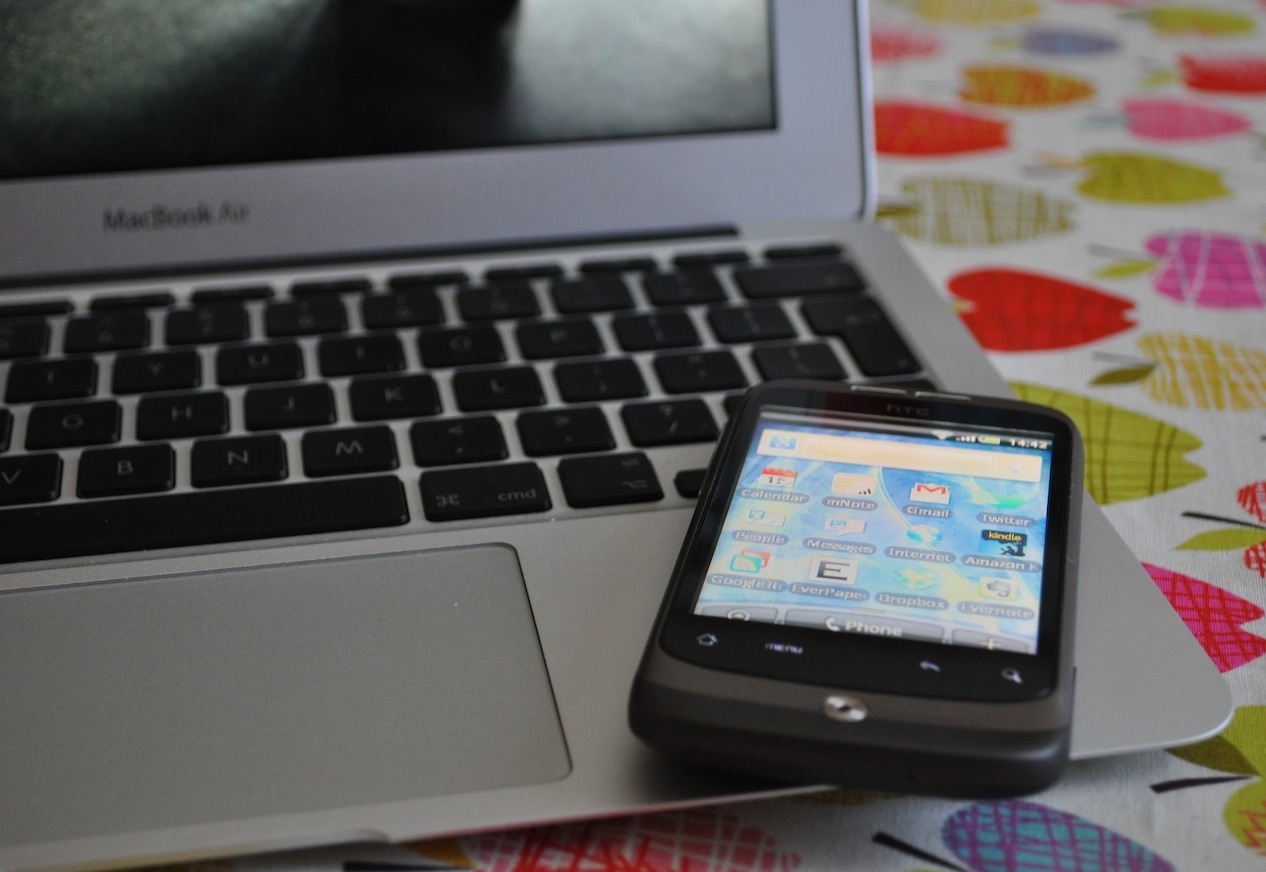
Some of you will know that I am quite the Apple fanboy. I currently own a MacBook Air, MacBook Pro (my second one) and an iPod touch. Having blogged twice about the apps I have installed on the iPod (during the early days of this blog), I felt it was time to confess to the fact that the iPod has been relegated to the status of ‘portable entertainment centre’. It now gets charged and used on long journeys mainly having been replaced by a HTC Wildfire – my ‘productivity centre’. Even with my deep love of all things Apple, I am not missing the iOS user interface one bit. The Android UI is just as pleasing and the phone was half the price of the iPhone 4.

Mobile phones and I

While I am a self-confessed technophile I resisted owning a mobile phone for a long time. I love technology but I felt that having a mobile phone would be too big a distraction and would put me in a situation where I am too contactable. I did not want to feel guilty if I was called and chose to ignore it. I knew that I would because I view my time as being extremely precious. However, I found myself frustrated using the iPod touch due to the lack of 3G connectivity. I didn’t want to text or make calls but it was highly frustrating to have to rely on finding a wifi signal when I was out and about. The Wildfire was my compromise then, not invoking a terrible cost to my pocket, I set up a PAYG account with Orange and away I went.

I have kept myself sane by putting in place a number of rules as to how I use the phone. All notifications are switched off so that I am not distracted. If I am doing something really important, I turn the phone off completely. I do not give out my number; only a small number of people have it. And finally, I only reply to text messages if it is really necessary. The people who do text me know this about me so I don’t feel any guilt if I forget to reply.

What I have gained by owning the phone is immense. It is my personal productivity machine; fully integrated into my day to day life. To illustrate this I am going to talk through the 10 most used apps on the phone:

The five apps I can’t live without

Twitter for Android – The main reason I bought the phone was to engage with my Twitter PLN at any given time. I tried a few apps including TweetDeck and for a while Twidroyd but have happily settled on the official app. In my opinion as good as any third party and it’s OS and iOS equivalents. I can keep up with the various streams, tweet, retweet (new and traditional methods), DM, search, even manage my lists which you can’t do with Twitter for Mac.

Everpaper – As there is no native Instapaper client for Android, I experimented with a few third party apps. Everpaper is by far the closest in matching the experience of the web and iOS apps. It is feature rich while managing to maintain that all so important minimal UI. I save a lot of reading material to Instapaper – blog articles, essays, reports… the list goes on. If I am not reading a book I will catch up with my Instapaper during my journey to work. I will also read it while queuing at Costa Coffee or any other time where I am forced to be idle and do not have access to my laptop.

Kindle – I have been totally converted to the value of being able to sync the book I am reading across multiple devices. I mean, it makes so much sense right? So I now have the Kindle app on my MacBook Air, MacBook Pro and Android phone. I don’t think it will be too long before I buy a Kindle as well. I use the Android app almost every weekday morning during my journey into work. So far I have read the entirety of the following books on it:

Focus by Leo Babauta
Poke the Box by Seth Godin
Keeping it Straight by Patrick Rhone
Out of our Minds: Learning to be Creative by Ken Robinson

I am about to start reading Learning Futures: Education, Technology and Social Change by Keri Facer.

Calendar – This is one of the few built in apps that I use. Synced with Google calendar; all appointments, meetings and urgent stuff are added with ease. It is the only app where, when necessary, I have the notification reminders turned on for urgent deadlines, meetings and appointments. Things that it would be absolutely detrimental for me to forget. However, I do not add my ToDo list to my calendar. My ToDo list is a text file which I keep in nvALT; synced with Simplenote. As a highly organised and motivated person, there is rarely anything in my ToDo list that I would forget to do any way.

Gmail – Again synced with my Google account I rely on this app to check my personal email at lunch time. I designate times for a number of specific tasks and this is the case with email. I check my work email first thing when I arrive at work and again at the end of the day. I check my personal email first thing in the morning and at lunch time. I try to avoid looking at email in the evening unless I know there is something urgent I need to reply to and did not manage to do so during the day.

The five apps which are useful at very specific times (but not essential)

Internet Browser – I use the pre-installed web browser. I use it mainly on an ad-hoc basis, for example, if someone shares a link in Twitter, it kicks me out to the web to view the image etc. Other than that I rarely use it.

Google Reader – As previously mentioned I allot specific times to a number of tasks. Task number one every morning is to catch up with the RSS feeds I subscribe to. I read the short ones and save the longer articles to Instapaper. I only use the Android app if that didn’t happen for some reason and on the rare occasions I am not reading a book and my Instapaper is empty – i may save this activity for the journey into work.

Evernote – As eluded to earlier, I am using Evernote to maintain my organisation as I work towards an Masters in Education. The mobile app has been used for two specific tasks. Taking photos of long extracts from books where I have not been able to access and electronic version and to take photos of slides at meetings/conferences. With the auto-sync it is a fabulous tool. See Doug’s post here about how he has used it.

mNote – As with Instapaper there is no native Simplenote app for Android. mNote is my app of choice. I occasionally need to update something and so will do it here. My use of this app has decreased since I bought my MacBook Air. Due to the Air being so light, I am tending to now take it to meetings – using nvALT to make notes instead.

Dropbox – This one needs little explanation. I want access to my documents at all times. My most common use is to read PDF files which I can’t access from Instapaper or the Kindle app.

The one app that I could live without but I’m glad I don’t have to

Swiftkey Keyboard – The built-in keyboard to the Android OS was not very good and this was one of the first features that I changed. It is the only app I have installed where I have handed over money but it was definitely worth it. Swiftkey has (IMO) the most accurate and useful predictive text I have experienced between using the iOS keyboard on my iPod touch, an LG touchscreen phone, and the built in Android keyboard. Part of the reason it works is that the keyboard’s UI is so clear and not over-sensitive that it is rare to make mistakes when typing. This combined with excellent ‘learning’ algorithms, Swiftkey predicts correctly most of the time.

iPod touch with 3G?

I have been asked by a few close friends who have had to endure me waxing lyrical about the phone whether I would buy an iPod touch, should it be released with 3G. After all, I make little to no use of the traditional phone features. To be honest, I don’t think so. I have become accustomed to the Android OS and until Apple includes something in iOS that is so revolutionary, it makes the Android OS obsolete, I will be sticking with what works for me. Besides, I’m a firm believer in the ‘one thing well’ philosophy. My Android phone does productivity really well. My iPod touch does entertainment really well. I’m happy with that.