 Since I last published thoughts on how QR Codes could be used for learning in a short audioBoo (click the link or scan the QR Code on the right), there has continued to be a growing and significant buzz about QR Codes on Twitter and in the blogosphere. A narrative is developing as ideas, experiences and best practices are shared and discussed.
The ball got rolling at TeachMeetX where Julian S. Wood delivered a thoroughly engaging presentation on storytelling and QR Codes. I couldn’t be there in person but was fortunate to catch most of what Julian had to say via UStream. What struck me during the presentation was not the quality of the tech but the pedagogical principles that underpinned the activities putting the technology where it belongs: at the heart of making the learning happen but not directing it. Hopefully, the video of the presentation will be available soon and everyone can see it. One of the tools that Julian used was Delivr which I have written about here and will mention again later in this post.
A couple of days later I was catching up with Twitter and dropped in on a discussion that was taking place about QR-Codes. Dughall McCormick tweeted out a link to a blog post he had written about QR Codes and an app called stickybits – see Tim Ryland’s article here for more info on that. Dughall shared a variety of ways that QR Codes/stickybits could be used, all with their various merits and implications. My personal favourite was this:
Stick a code on the front of a pupil’s exercise book. Feedback can be added in any format as time goes on. This can be done by peers, the student, teachers, parents etc. The same could be done for homework presumably
This struck me as immediately pertinent as there is a huge drive on assessment for learning and the marking of work in my school at the moment, what with Ofsted just around the corner. More importantly it is one of my many beliefs, in relation to education, that assessment can be a driving force in improving a students progress and attainment. This may be one way that I myself experiment with QR Codes and/or stickybits.
Dughall finished by sharing a few other useful links including a collaborative guide produced by Tom Barrett et al. about using QR Codes in the classroom. It is part of his excellent Interesting Ways series and so far there are 14 different ideas about how to use QR Codes.
Also mentioned by Dughall and tweeted out the same day was a post by the ever innovative David Mitchell – blogging about his use of QR Codes with his Year 6 class.
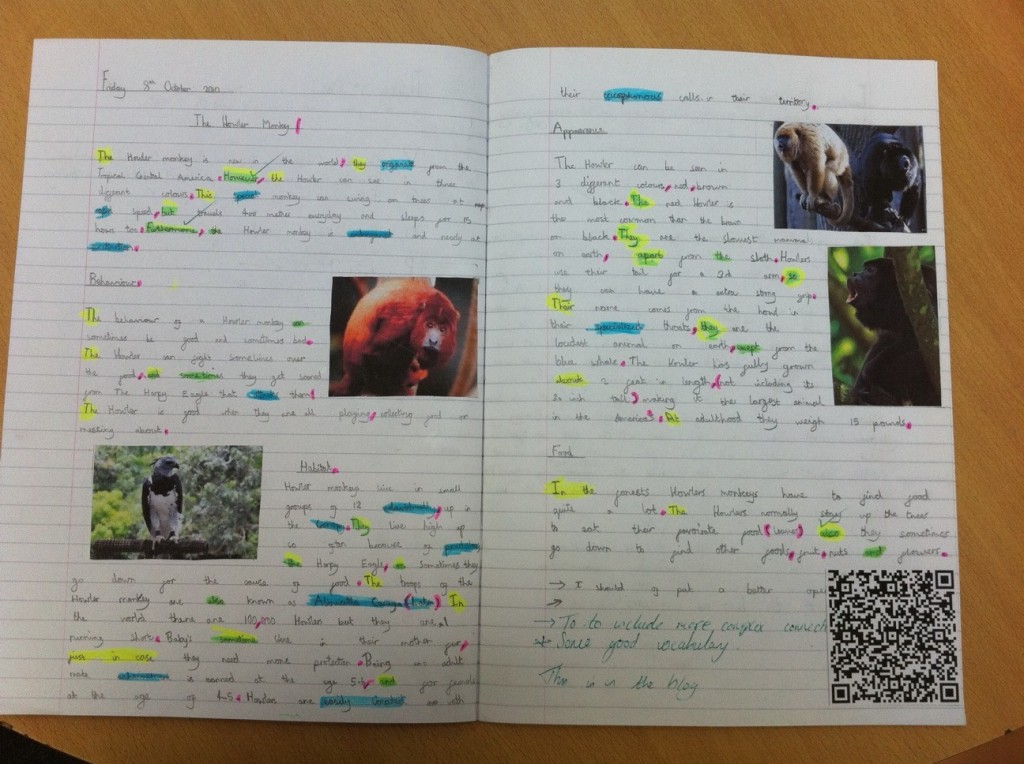
He explained and demonstrated through photos how they had been used. Essentially his students had drafted a piece of work in their books. They then wrote up their work on their class blog and generated a QR Code from their blog post’s URL. This was then stuck into their books. Instantly the gap between analog and digital work was bridged (or as David put it: “A Literacy book suddenly becomes an interactive book of weaved magic!”).
By allowing anyone to scan the code and see the final draft of the work while looking at the first draft it changes the engagement and interaction with the students work bringing the student, teacher, parent closer to creative and developmental process. A clever and highly effective use of QR Codes I think.
Below is an example of one of the images from David’s post – click to zoom and then scan the code – it really works!
As the discussion continued on Twitter over the next couple of days more and more resources and posts related to QR Codes began to come to light, demonstrating the fact that the technology is not that new and that educators have been toying with it for a while now.
One such post that was tweeted was from Ollie Bray who had written about QR Codes (back in 2008) in a post titled: iPhone in Education – Using QR Codes in the Classroom.
In his post he details how QR Codes work with some clear broken down screen shots. Towards the end of the post Ollie makes a couple of suggestions about potential uses but overall it stands as a good post for QR Code novices to help them understand the basic principles.
This was followed by a link to a PDF document (hosted by the EDUCASE Learning Initiative) titled: 7 Things You Should Know About QR Codes (written in 2009). The document is well structured and concise (2 pages), offering answers to basic questions like: “What is it?”, “How does it work?”; to more complex ones like: “What are the implications for teaching and learning?” This is a good starting point for QR Code novices. Download here.
There were a few more posts that were dragged up from the archives but I will not comment on them all here. A Twitter search for QR Codes should provide some useful results.
The final post I wish to discuss is fresh and new and was only published this week, on October 26th, over at the blog of David Hopkins – Don’t Waste Your Time. Titled: QR Codes: It’s not all about the phone, you know. David offers up three potential applications that could be used to scan QR Codes from your desktop computer. This was interesting and I am going to download and play with the Desktop QR Code Reader myself.
Reading David’s most recent post though led me back to his many other posts about QR Codes, some of which I had read through a few weeks ago when I had just begun to look at QR Codes myself. I felt that I would re-mention the post: QR Codes in the Classroom. The explanation and suggested uses are very good but even better than the written word is the video David has included of QR Codes in action. Scroll through the post, find the video and give it a watch. If you are still unsure about the potential of QR Codes, you won’t be after you have watched the video.
—
With a growing list of potential uses and some very well thought out pedagogical approaches I believe it’s fair to say that this technology is worth investing the time in. To get started with my own use of QR Codes I am going to focus on two areas:
1. Creating a class project based around similar principles to those presented by David Mitchell. I really felt the simplicity of linking physical writing with online content was an interesting notion that warrants further exploration.
I need to give it more consideration but I see excellent opportunities here to connect the creative/tactile freedom of my classroom with some of the tools that I already use with my classes online. One idea that came to mind was to get my students to collate a variety of useful material on a Lino It canvas, generate a QR Code for their wall. Then back in the classroom preparing for their controlled assessment they could scan the QR Code (now stuck in their books) to access that information.
Once I have planned the activity better and have the results I will certainly blog and share it.
2. Educating students, parents and fellow teachers on what QR Codes are and how they can be of use inside and outside of the classroom. I think there is an opportunity to share simple info like revision tips, short helpful videos and other similar materials. In principal this is straight forward as I have seen several good examples of QR Codes being used. One of the keys is to include info on how to scan the codes and where to get an app to do it.
With this in mind I found this clip from CSI on YouTube. It provides a fairly clear and engaging explanation of what a QR Code is.
I have shared it via Delivr which displays it on a dedicated page making it easy for it to be reshared. What’s more, as I mentioned in my blog post about Delivr when viewed on a mobile phone the page is optimised for mobile screens.
The success of sharing info in this way will be more difficult to judge than within the controls of a classroom based activity. This is why I will be using Delivr to generate the codes. Signing up for an account allows you to track the QR Codes you create. I will be able to get instant raw data on whether the codes are being scanned.
Again I will blog and share the results.
Before I close this post I will share one more useful link. There are several pages on the web that help you find the right QR Code reader for your phone but I felt that this one from PercentMobile was the most effective. Simply select the manufacturer and handset model that you own and it then provides you with a link to an app that will work with your device. Get out there and get scanning.
If you have anything to add to the QR Code narrative, perhaps you have experimented with them in your classroom; or you have a useful resource to share; or you have read a good blog post then please share it via Twitter using the hash tag #qrcode or reply to this post.