This is a recording of a blog post published earlier this month. You can read the original post here where you will find all of the links to people, books and concepts that I mention in the recording.
You can find all of my Boos here.
 I finished reading Seth Godin’s Linchpin a few weeks ago and while I found it to be an interesting read, the main thesis of the text was nothing I didn’t already practise. I strive every day to “ship” and “give gifts” and I can’t evangelise enough on how important both of these concepts are as a teacher.
You have to “ship” because your day is filled with deadlines: lessons to be planned and taught, data to be input, reports to be written and homework to be marked. If you want the learning inside and outside of your classroom to be any good you have to “ship” on all of these tasks. Also, you have to “give gifts” because it’s good to be generous. Share what you do, not to get noticed and win promotion but to help make sure that every student gets the best possible education they can. I love to “ship”. I love to “give gifts”. Why? Because I care about learning. In fact, I love learning; it’s the reason I’m a teacher.
Shipping is fraught with risk and danger.
(Fear of shipping, Godin, 2010)
It’s easy to be afraid of “shipping” and “giving gifts” because many teachers are perfectionists and many teachers are protective about what they do.
To questions like these, I say remember it’s the students in your classroom that matter, so get smart. Digitise everything you do/use and back it up. Reuse and improve should become your personal mantra from day one. The better you get at this the more time you will have for the marking and data analysis which is (honestly) more important than much of the planning that you spend your time doing. What’s more, good formative assessment and understanding your students’ potential will ultimately lead to better planning any way. They inform each other and will lead to better teaching and better learning.
One of the keys for me, in ensuring that I “ship” on time is the way I deal with email. I, like many of you, work at a school where email has become the number one method of communication. However, the reality of this is that your inbox can have a stranglehold on your productivity as a teacher and certainly get in the way of the learning by impinging on the time you should be spending marking, planning and experimenting.
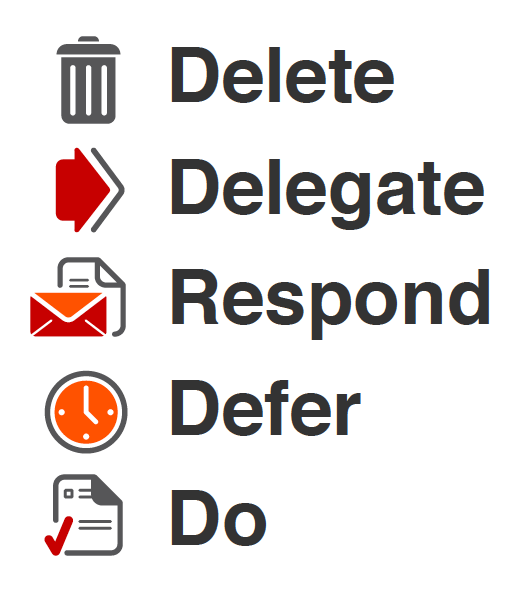
To combat the email onslaught I religiously use the following approach to email set out by Merlin Mann in Inbox Zero. Implement this into your work day when checking your email and your productivity will improve significantly, leaving more time for the marking, planning and most importantly the learning.
As for “giving gifts”: blog. Blog what you do, get a creative commons license and don’t let someone else show your ideas off. Do it yourself! Deliver CPD, sign up to present at a TeachMeet, build sessions into department meetings to share your ideas and encourage colleagues share what they are doing. If you take control of your gift giving you will find that you can (and will want to) share selflessly. Others will benefit but so will you.
To close, I will give a gift and allow Seth to have the last word:
A life spent curled in a ball, hiding in the corner might seem less risky, but in fact it’s certain to lead to ennui and eventually failure.
(Fear of shipping, Godin, 2010)

I had planned to blog about my use of Google Docs this past week. With it being half term, I certainly had the time to do so, but instead, I ended up using much of my time improving the design and functionality of my blog.
Here is a summary of the changes that I have made.
Design
One of the key things that I wished to change was the appearance of the blog, particularly the home page. I wanted it to be more minimal, have less information, with limited colour. Ultimately I wish to just show the 10 most recent blog post titles but for now I have set the blog to simply show the most recent post. I also changed the colour of the “visited links” as they were too light.
I created two new static pages. The first of which was a contact page including a self made form utilising the site:EmailMeForm. The other a dedicated page for the #movemeon book which I contributed to. This allowed me to remove a badge advertising the book from the blog’s sidebar as well as some text and hyperlinks.
To further improve the look of the blog across all of the pages I made further changes to the sidebar. I began by removing my Twitter stream and some unnecessary text. I then considered changing the subscription and follow links from plain text to attractive “minimal” buttons. Using my Twitter PLN I found some links to different button sets. After settling on a set which I found here, I created two mock ups and tweeted them out asking people to vote for either the set on the left or the right.
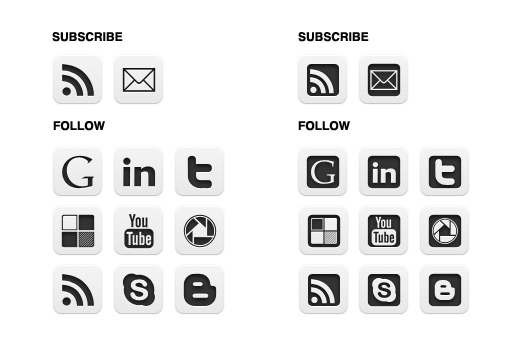
The set on the left received the most votes and that was my preference as well so I decided to go with it and went about adding the buttons to my blog (more about this process below). I also moved the buttons up to the top of the sidebar to increase their visibility. (I’m still mulling over the final row at the bottom which would include my Google Reader shared items, a link to call me on Skype and a link to my school Media Studies blog.
Finally, I edited my About page, updating sections with some of the projects I have been involved with this year.
Functionality
In making some of the aesthetic changes mentioned above I was also able to make some improvements to the functionality of my blog.
Changing the subscription and follow links from plain text to buttons meant that I had to learn more about HTML. (I already had some limited knowledge.) I learned how to add the buttons, hosting them in picasa and then linking to them. I wanted them to open in a new window/tab so I researched the code needed to make that happen and I also learned how to make text appear when the cursor hovers over them. I am very pleased with the finished functionality and hope that their placement at the top of the sidebar will help to increase my web presence.
Having learned how to make web links open in a new window/tab I set about editing all of my blog posts from May to do the same. Sticking with HTML I also added some code to my blog’s template to display related posts titles at the bottom of each post. This should hopefully keep visitors on my blog for longer reducing my bounce rate. I then also removed the Sharethis widget (and related functionality) and replaced it with a TweetMeme retweet button. (See the bottom of this post.)
Finally, I made two significant changes to improve the subscription feed and data that I can get about my blog’s site traffic. I began by signing up with Google FeedBurner and syncing my old blog feed. I implemented a variety of additions (“FeedFlare”) to improve the promotion of my blog including syncing my Delicious bookmarks into my blog’s feed and making a wide variety of options for sharing my posts available to subscribers. I also set up subscription by email which I had seen on several blogs by people that I respected so felt it would be wise to offer my readers something similar. The final piece of code that I added to my blog was that of my Google Analytics account. It has already provided me with far more interesting information about my blog than the simple visit counter sitting at the bottom of my sidebar (which I may remove very soon).
So, no post about Google Docs but a lot of blog activity none the less. I am happy with the way the blog is looking and for now will give the tweaking a rest. I am not done though. Once the summer holidays begin I think that I will return to this process and do the following:
I am always happy to know what people think so please comment below or tweet me @jamesmichie.
Image courtesy Štěpán Prokop on Flickr.